What Is a Project Dashboard: Definition, Elements, and Structure Explained

A project dashboard is a visual interface that centrally consolidates all relevant project metrics such as status, deadlines, budget, resources, and risks in real time. Through configurable widgets, it serves as a central management and controlling tool in project management and makes the condition of a project visible at a glance at any time.
A project dashboard differs from a traditional reporting document in two key ways: While a report is static and documents a retrospective snapshot, the dashboard provides interactive analyses and is continuously updated. It also differs from a portfolio dashboard, as the latter aggregates metrics across multiple projects and serves strategic portfolio management, while the project dashboard focuses on the operational management of an individual proposal.
The concept can be defined across several dimensions. Depending on the scope, there are single-project, multi-project, and portfolio views, which are used in different areas of application. In terms of content, a dashboard is built around fixed core elements: project status, deadlines including a Gantt chart, budget, resources, risks and activities. The structure itself follows a systematic process from defining goals through to ongoing maintenance.
Its practical value results from three effects: A dashboard creates transparency, enables early identification of deviations as an early warning system, and accelerates informed decisions. In doing so, it addresses central problems such as a lack of overview as well as schedule and budget overruns. For persons responsible of the project, in medium-sized companies and corporations, it thus becomes a crucial tool for centrally managing traditional, agile and hybrid projects through professional project controlling.
Table of Contents
- What Types of Project Dashboards Are There?
- Where Are Project Dashboards Used Effectively in Project Management?
- What Elements and Components Does a Project Dashboard Have?
- Why Is a Project Dashboard Important?
- How Do You Create a Project Dashboard?
- What Should You Look for in Project Management Software with a Dashboard?
- Conclusion on Project Dashboards: Indispensable for Solid Project Management
- Frequently Asked Questions About Project Dashboards
What Types of Project Dashboards Are There?
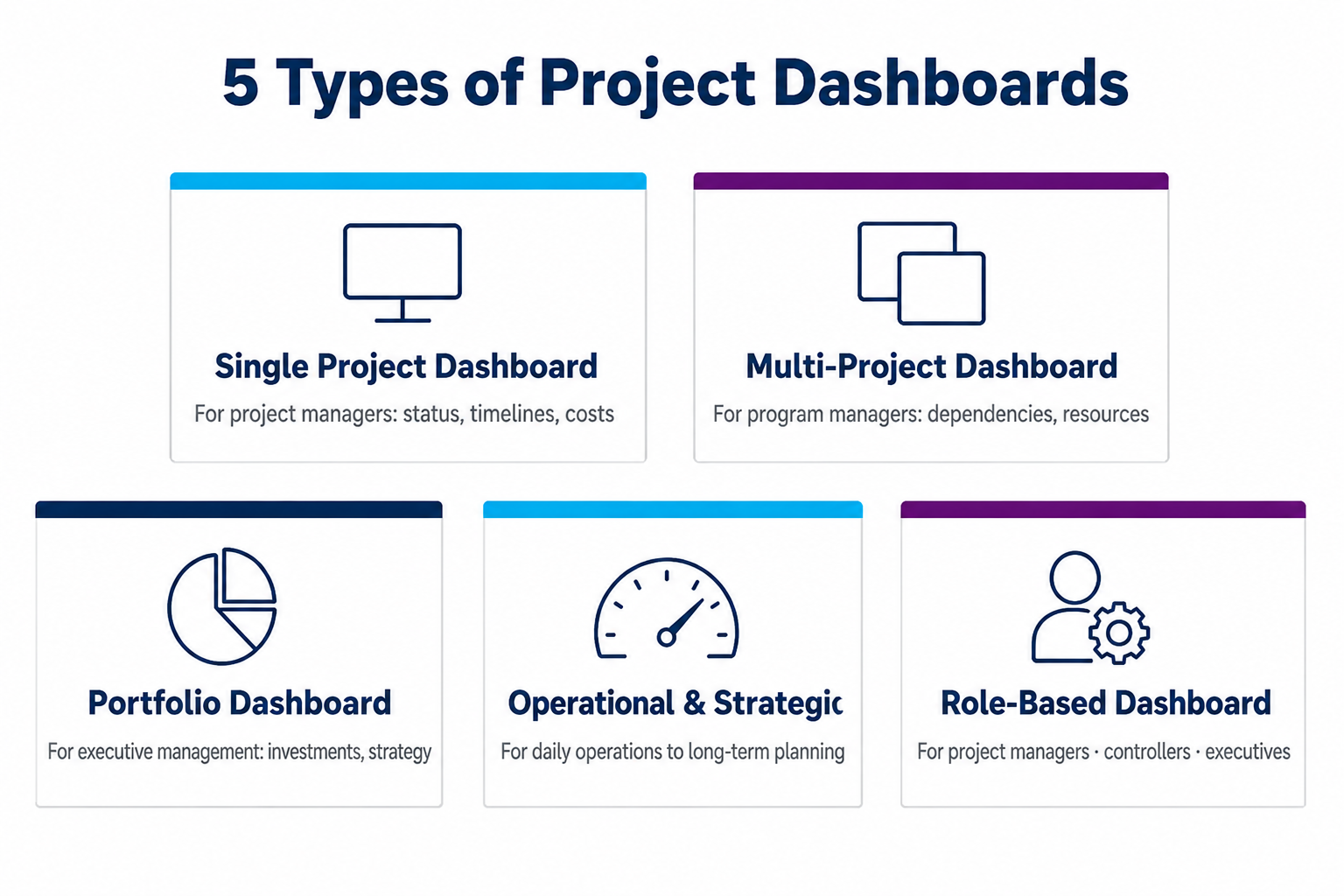
Project dashboards do not come in a single standard form; instead, they are divided into several types according to scope and management purpose. Which variant is suitable depends on the number of projects, the target audience and the respective management level. The following five forms are the most relevant in practice:
- Single-Project Dashboard: This view focuses on a single proposal and shows its status, deadlines and costs in detail. It is suitable for project leaders who manage a clearly defined project operationally and closely track its progress.
- Multi-Project Dashboard: A multi-project dashboard combines several projects running in parallel in a shared overview. It makes cross-project dependencies and resource conflicts visible and helps program or multi-project managers weigh priorities between proposals.
- Portfolio Dashboard: At this level, projects are aggregated and evaluated according to strategic criteria. The portfolio dashboard is the tool of portfolio management and helps management prioritize investments and assess the direction of the entire project portfolio.
- Operational and Strategic Dashboard: Operational dashboards provide detailed metrics for day-to-day work, such as task status and utilization. Strategic dashboards aggregate this data into a small number of management metrics and are aimed at decision-makers responsible for the long-term direction.
- Role-Based Dashboard: This variant adapts content and level of detail to the respective recipient role. A project manager sees different metrics than a controller or executive board member, ensuring that each target group receives exactly the information relevant to its decisions.
In high-performance project management systems, this differentiation is also reflected technically: Operational multi-project management is carried out through a dashboard at project level, while strategic management consolidates the data in a holistic portfolio dashboard. At this level, additional functions such as quality gates for regular phase reviews and portfolio simulations for project prioritization are added.
Where Are Project Dashboards Used Effectively in Project Management?
A dashboard in project management delivers value precisely where a large amount of information converges and quick decisions are required. For project managers and decision-makers in mid-sized companies and corporations alike, it supports work across all project phases, from planning and ongoing management to the final review. The most important areas of application at a glance:
- Daily Project Management: In day-to-day project work, the dashboard serves as the central point of reference for checking progress, open activities and current metrics. Project managers can see where a proposal stands without having to ask for updates and maintain control of ongoing management through consistent project controlling.
- Status Meetings: In a status meeting, the dashboard provides a shared data basis and replaces time-consuming manually compiled individual reports. Everyone involved discusses the same figures, making meetings shorter and more binding.
- Stakeholder Communication: Stakeholders are all people and groups with an interest in the project, such as clients, specialist departments, or management. A condensed dashboard informs them about the project status in a way tailored to the target group, without requiring them to delve into operational details.
- Multi-Project Management: Where several projects run in parallel, the dashboard shows utilization, deadlines, and priorities across projects. Persons responsible for the program can identify resource conflicts between proposals and take corrective action early.
- Early Warning of Deviations: Using thresholds and traffic-light logic, the dashboard acts as an early warning system that immediately flags critical developments in deadlines, costs or capacities. This leaves time for corrections before a small deviation becomes a real problem.
- Final Review and Lessons Learned: At the end of the project, the dashboard documents how planned and actual values compare and provides key metrics for retrospective analysis. This analysis creates a reliable basis for planning future projects more effectively.
The benefits are relevant across industries, but are particularly pronounced in project-intensive sectors such as pharmaceuticals, mechanical engineering and electronics, where many proposals compete for the same resources at the same time.
A practical example is Uhde High Pressure Technologies, a thyssenkrupp company in mechanical and plant engineering. Around 170 customer, service, and development projects, with average durations of one to two years, are managed there in parallel. Before a central multi-project management system was introduced, schedules were largely maintained in spreadsheets and individual project schedules. Monitoring was correspondingly labor-intensive, and delivery deadlines often could not be met. Today, a cross-project dashboard displays all overdue work packages, either across the entire portfolio or filtered by individual project groups. Impending delays therefore become visible at an early stage, allowing management to intervene in a targeted way before they affect the delivery date. According to the customer, on-time delivery performance has improved significantly and measurably as a result.
What Elements and Components Does a Project Dashboard Have?
A meaningful project dashboard consists of six core elements that map the central project dimensions as widgets. Widgets are individual, configurable display components that each show a metric or graphic and can be freely combined into an overall view. Together, they provide the key project KPIs, meaning the performance metrics (Key Performance Indicators), by which project success can be measured. They cover the four traditional project dimensions of scope, time, cost, and resources, supplemented by risk and activity management. This creates a 360-degree view of the project from the individual project metrics. The following overview shows which elements are included:
- Project Status and Progress in Real Time: shows the health and completion level of the project.
- Deadlines, Milestones, and Gantt Chart: visualize the schedule and important checkpoints.
- Budget and Cost Metrics: compare planned and actual costs.
- Resource Utilization and Capacity Planning: show the availability and utilization of employees and teams.
- Risk Matrix and Early Warning Indicators: assess risks by probability and impact.
- Task and Workflow Overview: consolidates activity status and responsibilities.

1. Project Status and Progress in Real Time
The status element provides the project status in real time and first answers the most important question about the health of the project. A traffic-light indicator signals this status using the colors red, yellow, and green. It makes the need for action visible at a glance. In addition, the completion level shows as a percentage how far the project has progressed. Only by comparing this actual value with planned progress (planed-versus-actual comparison) does it become clear whether the proposal is on schedule or falling behind. Systematically recording such metrics for plan-versus-actual comparisons is one of the foundations of reliable project controlling.
As helpful as these metrics are, they need to be interpreted correctly. The completion level alone is easily overvalued:
The percent complete alone should be treated with caution: "70 percent complete" says nothing about whether the critical last 30 percent can still be completed on schedule.
Similar considerations apply to the traffic-light indicator. If it only shows the current state, a recent change from green to yellow looks the same as a yellow status that has persisted for three months, yet these are completely different signals. Only a trend view, for example through milestone trend analysis, makes the direction visible rather than just the current state.
The real added value lies in how up to date the information is. Because the status element updates automatically from the stored data, deviations become visible immediately without anyone having to manually request status reports. Managers in particular need this overview regardless of location. Modern systems therefore rely on browser-based web clients that make utilization charts, Gantt charts and project status reports available online at any time. This ensures that progress monitoring remains possible even in decentralized and mobile settings.
2. Deadlines, Milestones, and Gantt Chart
The time dimension of a project is represented by the Gantt chart. This bar chart displays all activities on a timeline and makes their duration and dependencies visible. Project participants can therefore see at a glance which activities build on one another and when each work step must begin. Anyone looking more closely at project planning with a Gantt chart will find it to be the central tool of traditional schedule planning.
Within this schedule, milestones mark important control and decision points, such as the completion of a project phase or an approval. They serve as fixed points at which progress is reviewed. The critical path is also visible, meaning the sequence of tasks with no float whose delay directly pushes back the project end date. Schedule deviations therefore become apparent early, allowing delays to be identified and mitigated before they jeopardize the entire schedule.
3. Budget and Cost Metrics
For financial budget monitoring, the cost element compares planned costs with the costs actually incurred. This plan-versus-actual comparison shows budget utilization, meaning the proportion of the budget already consumed at a given point in time. If a project is at risk of exceeding its budget, this becomes immediately visible here.
More informative than the pure cost status is the Earned Value Analysis (a method that relates achieved project progress to the costs incurred to achieve it). It answers whether the resources spent so far are justified by the actual progress and thus reveals gradual cost overruns. In addition, a cost forecast based on current developments predicts whether the budget is likely to be met by the end of the project. This shifts the focus from purely looking backward to proactive management.
4. Resource Utilization and Capacity Planning
Resource utilization shows how heavily individual employees and teams are scheduled over the planned period. The utilization rate expresses as a percentage what share of available working time is already allocated to activities. Color coding makes overload, underutilization and impending capacity bottlenecks, periods with more work pending than available capacity, immediately visible. Activities can therefore be redistributed early before individual people become overloaded. This element addresses one of the most common pain points in day-to-day project work: chronic resource bottlenecks.
In addition, capacity planning systematically compares available and required resources and answers whether a project is realistic with the capacities available. This view becomes particularly important in a multi-project environment, where several proposals compete for the same specialists. Those who understand the fundamentals of operational resource planning can balance bottlenecks across projects.

5. Risk Matrix and Early Warning Indicators
The risk matrix places identified project risks in a two-dimensional grid. One axis represents the probability of occurrence (how likely a risk is to actually occur), while the other represents the extent of damage (how severe the consequences for the project would be). Combining both values shows which risks require immediate attention and which can initially simply be monitored. Structured project risk management of this kind prevents critical threats from being overlooked.
In addition, early warning indicators monitor defined thresholds and trigger alerts via a traffic-light system as soon as a project enters a critical range, for example when a deadline overrun is imminent or the budget float has been exhausted. Together, the risk matrix and early warning indicators form an early warning system focused on what lies ahead. Instead of reacting only after problems have occurred, project managers can take proactive corrective action while there is still room to maneuver.
6. Activities and Workflow Overview
The activity overview consolidates all activities in a project and organizes them by activity status, meaning whether they are pending, in progress or already completed. Each activity is linked to a person responsible and a due date, making it clear at all times who is delivering what and by when. This transparency around responsibilities also reveals bottlenecks in the workflow, for example when activities pile up with a single person.
The workflow element, meaning the representation of processing progress along defined work steps, is often visualized as a process model or in the form of a Kanban board. On such a board, activity cards move from column to column, making progress tangible. This visualization via a Kanban board is particularly valuable in hybrid projects. There, management plans traditionally using milestones and deadlines, while the development team works agilely with Kanban. If the activities handled agilely in a collaboration tool are seamlessly fed back into traditional schedule planning, the workflow widget in the central dashboard always reflects the correct overall progress without system breaks.
Why Is a Project Dashboard Important?
A project dashboard has evolved from an optional aid into an indispensable management tool, especially when many projects are running in parallel. As a central project controlling dashboard, it combines the advantages that make the difference between reactive control and active management:
- Central Transparency and Overview: A dashboard brings all relevant project data together in one place. It thus eliminates the lack of overview that quickly arises when many projects run in parallel. Instead of gathering information from emails, spreadsheets, and individual reports, those responsible can see the current status in a single view.
- Early Identification of Deviations: As an early warning system, the dashboard reports schedule, budget, and resource deviations as soon as they begin to emerge. This leaves enough time to take corrective action before a delay turns into a schedule or budget overrun.
- Faster, Well-Founded Decisions: Because current metrics are available at any time, those responsible make decisions on a reliable data basis rather than relying on gut feeling. This shortens coordination paths and speeds up responses to changing conditions.
- Better Communication and Collaboration: A shared dashboard creates a consistent information base for the team, management, and stakeholders. It replaces inefficient communication across scattered channels. Everyone involved discusses the same figures, reducing misunderstandings.
- Optimized Resource Utilization: A transparent view of utilization and capacities makes it possible to deploy employees where they make the greatest contribution. Both overload and idle capacity become visible and can be balanced.
The exact scale of these effects is rarely measurable down to the last decimal place in practice, but the direction is clear: Users consistently report noticeably fewer follow-up questions and emails, higher schedule adherence, and significantly less manual data maintenance. A central dashboard, according to recurring feedback from users, simply eliminates “countless emails”. This observation is consistent with the Project Management Institute’s (PMI) Pulse of the Profession studies, according to which more mature project management processes reduce the share of investment wasted through poor project performance to around 9 to 10 percent.
How Do You Create a Project Dashboard?
A project dashboard can be created by following a clear process that ranges from objectives and data integration to visualization. The following six steps have proven effective in practice:
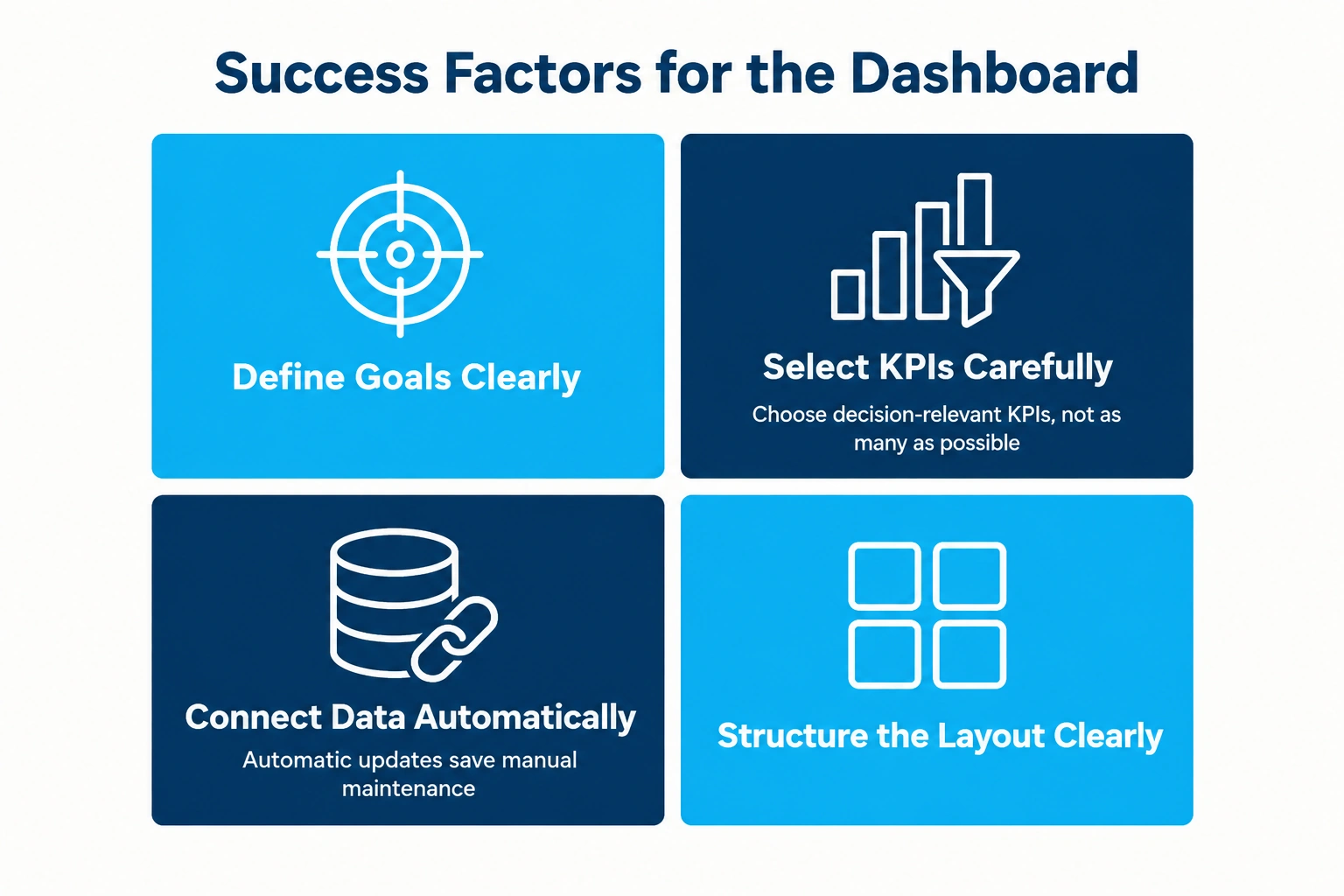
- Define Objectives and Purpose: First clarify which questions the dashboard should answer and which decisions it supports. A dashboard for operational management pursues different objectives than one used for monthly management reporting.
- Define the Target Audience: Determine who will use the dashboard, as this affects its content and level of detail. A project manager needs granular metrics, while senior management prefers a condensed view of a few key management metrics.
- Select Relevant Metrics: Deliberately choose the project metrics that are relevant to decisions rather than simply including as many as possible. Focus on the KPIs that actually signal a need for action and avoid overloading the dashboard with data that nobody evaluates.
- Connect Data Sources: Connect the dashboard to the systems from which the data originates, such as project planning, time recording, or cost accounting. These data sources provide the basis for keeping the display automatically up to date without manual maintenance.
- Design the Layout and Widgets: Arrange the widgets so that the most important information immediately catches the eye. A clear layout with sensible grouping and restrained use of color makes it easier to grasp the situation quickly.
- Test, Roll Out, and Update: Test the dashboard with real data, gather user feedback, and adapt it. After rollout, it should be reviewed and refined regularly so that it remains meaningful over time.
The most common mistake when setting up a dashboard lies less in the technical setup than in how the data is handled: Users often confuse completeness with clarity and want to see as many data points as possible at a glance instead of focusing on the few metrics that actually trigger a decision. As a rule of thumb, eight to twelve clearly defined metrics are usually sufficient; anything beyond that quickly turns into a confusing chart clutter.
The limit is reached when decision-makers have to ask what a metric means. At that point, the dashboard no longer manages anything; it merely decorates.
The most important lesson from practice is therefore: First clarify which management question really needs to be answered in day-to-day project work. Then, tailor the available views and filters specifically to that question instead of trying to display everything at once.
Anyone who does not want to start from scratch can begin with a ready-made project dashboard template. Such templates provide a proven structure with common metrics and can then be adapted to individual requirements. They noticeably shorten the setup process, but should not replace the individual selection of decision-relevant metrics.
What Should You Look For in Project Management Software with a Dashboard?
The dashboard requirements described above are reliably covered by specialized project management software.
An established provider in the German-speaking market is PLANTA. PLANTA Projektmanagement-Systeme GmbH, based in Karlsruhe, has been developing “Made in Germany” project management software for more than 45 years and is therefore one of the most experienced vendors in the market. One of its key unique selling points is its leading functionality for hybrid project management, combining traditional, agile, and hybrid ways of working in a single system.
For central management, this means: PLANTA creates transparency across complete single-project and multi-project management, both operationally and strategically, all the way up to portfolio management. Real-time overviews and early warning systems provide exactly the dashboard elements described in this article, from traffic-light status indicators and Gantt charts to the risk matrix. The result is a multi-project dashboard that makes the status of all proposals visible at a glance.
The interaction between the two editions follows a clear principle. In practice, project management with PLANTA project handles operational single-project and multi-project management, including resource, cost, and risk management. For strategic project portfolio management, PLANTA Enterprise extends this foundation with higher-level management and prioritization functions. Both solutions support traditional, agile and hybrid methods and are available either on-premises or as cloud/SaaS versions, while customizable workflows and dashboards can be flexibly adapted to the respective business processes.
This flexibility continues to grow: Future releases will expand the dashboards with additional options for tailoring individual widgets to specific requirements. This places even greater emphasis on the question of which metric reaches which target group, because users will have more freedom to configure their dashboards.
The specific advantages can be summarized as follows:
- Better resource utilization through a central view of capacities and utilization across all projects.
- Risk reduction through integrated early warning systems that flag deviations at an early stage.
- Improved collaboration through centralized communication across all projects in one place.
- Flexible adaptation to traditional, agile, and hybrid ways of working within a single software solution.
Anyone who would first like to evaluate the solution without obligation can start with the free trial version. All other pricing models for PLANTA project and PLANTA Enterprise, whether as a cloud subscription or an on-premises purchase, are transparently listed in the pricing overview.
Conclusion on Project Dashboards: Indispensable for Solid Project Management
Bringing central project metrics together in a single interface is the core function of a project dashboard. Depending on the management level, the spectrum ranges from single-project and multi-project dashboards to portfolio dashboards. The six core elements (status, deadlines, budget, resources, risks, and activities) provide the complete picture. Solid project management ultimately depends on real-time transparency: Deviations in deadlines, costs, or capacities can be identified in good time through early warning indicators, long before they become a problem. This turns the dashboard from a simple display into a strategic tool that perfectly combines structure, content, and measurable value.
For project managers and decision-makers in mid-sized companies and corporations alike, the dashboard is therefore directly applicable. Whether managing a single proposal, transitioning to cross-project multi-project management or selecting suitable software, the best way to get started is step by step. Begin with the few decision-relevant metrics needed for reliable project controlling, the integrated early warning system will then automatically report critical deviations. Professional project management software with customizable, hybrid-capable dashboards takes a great deal of manual work off your hands. At the strategic level it is also worth considering project portfolio management software that consolidates individual projects into a manageable overall portfolio.
Frequently Asked Questions About Project Dashboards
How Much Does Project Management Software Cost?
Prices vary widely, from free basic tools to several hundred euros per user per year for enterprise solutions. The actual cost depends on the range of functions, number of users, deployment as cloud or on-premises, and multi-project capabilities.
Can You Create a Project Dashboard in Excel?
Yes, a simple project dashboard can be created in Excel using pivot tables and charts, for example based on a project dashboard template. However, Excel quickly reaches its limits when it comes to real-time data, multi-project management and automatic updates, and requires a great deal of manual maintenance.
What Is the Difference Between a Project Dashboard and a Portfolio Dashboard?
A project dashboard focuses on a single project and its operational management, while a portfolio dashboard aggregates multiple projects and evaluates them strategically. The portfolio dashboard therefore serves prioritization and portfolio management, while the project dashboard supports detailed day-to-day management.
Which Metrics Should a Project Dashboard Include at a Minimum?
At a minimum, it should include project status, progress, schedule, and budget adherence, and resource utilization. Depending on the type of project, supplement these basic KPIs with risk and activity metrics so that the dashboard provides a complete picture and shows the figures that are actually relevant to decisions.
Is a Project Dashboard Also Suitable for Agile Project Management?
Yes, agile dashboards visualize metrics such as the burndown chart (which shows the work remaining in the current sprint), sprint progress, and velocity. Hybrid software in particular combines these agile metrics with traditional controlling metrics in a central dashboard, bringing both worlds together.